
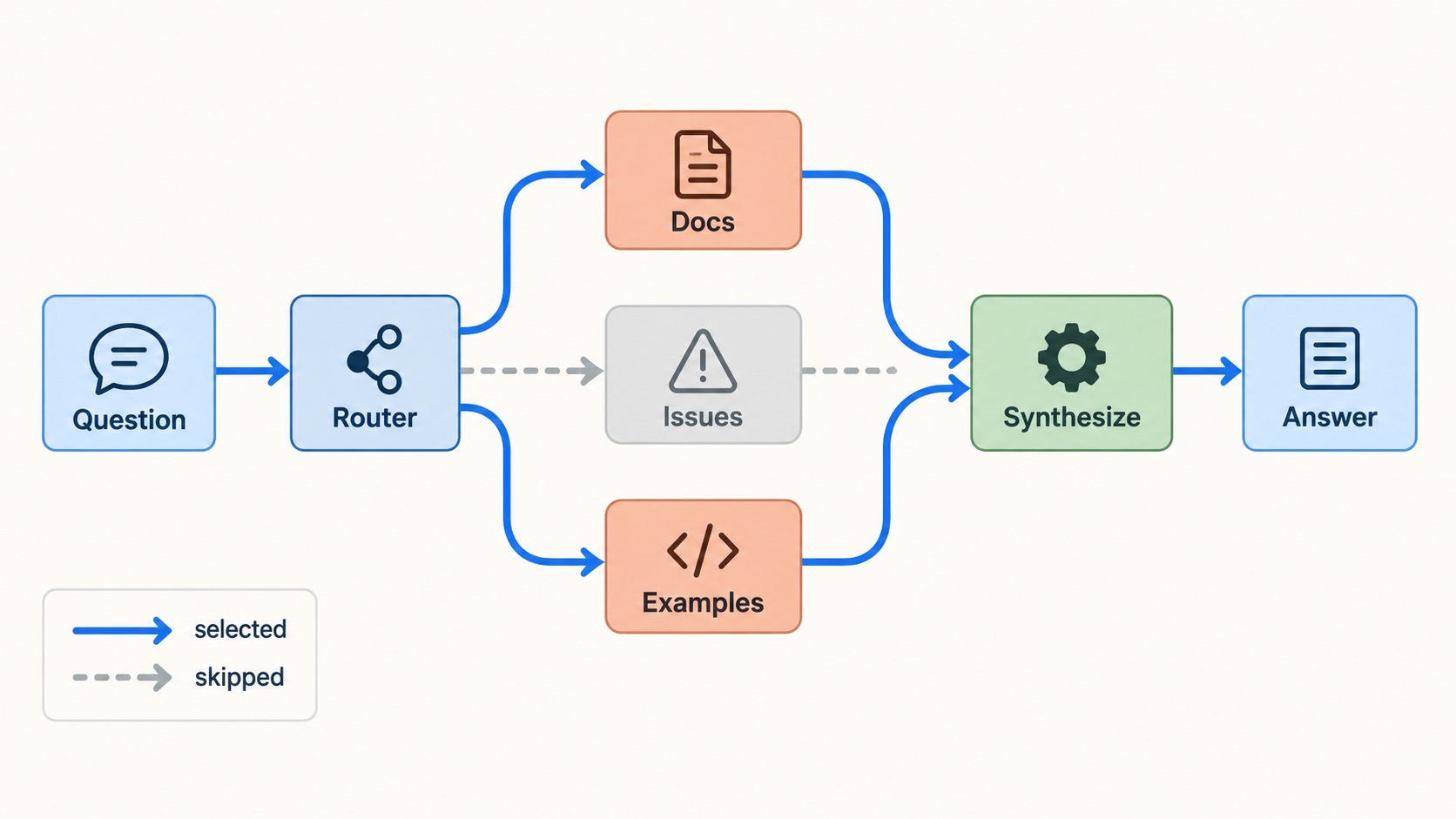
LangGraph routing is the point where a multi-agent graph stops broadcasting work and starts making deliberate choices. It decides which specialist should handle a request, which tasks can run at the same time, and when their findings are ready to combine.
In the previous tutorial on LangGraph shared state, we defined safe information flow. Here, you will use that state to choose the next nodes in the graph—then run only the relevant work in parallel.
The flow at a glance
- Route: inspect the question and select the specialists that can help.
- Fan out: create one targeted task for each selected worker.
- Merge: wait for the active branches, then synthesize their findings.
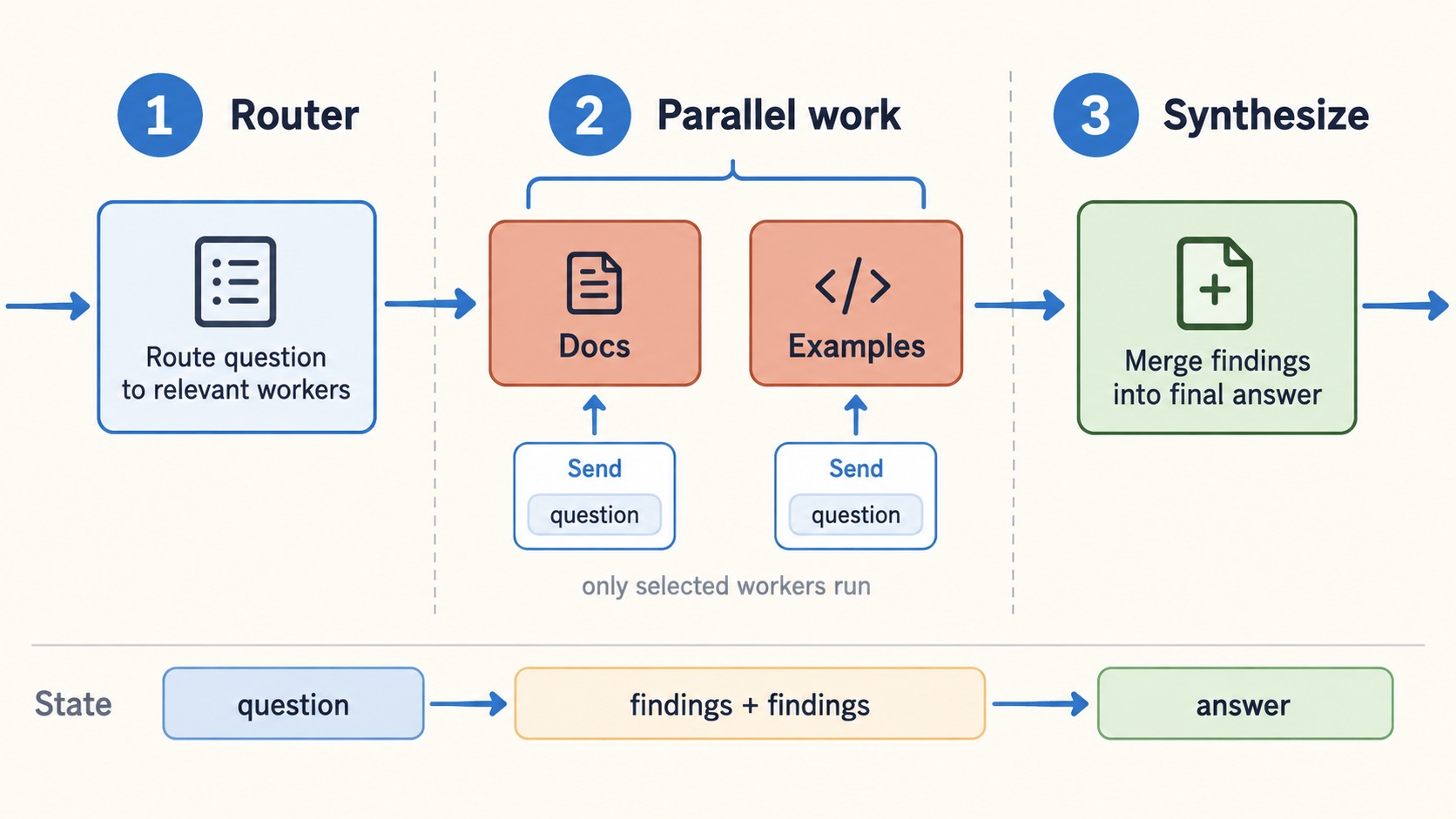
The router runs first. Selected workers share the next super-step, then their updates merge before synthesis.
The key decision: parallel work is useful only when the tasks are independent. If one step needs the result of another, keep the route sequential.
What you will build
Our example answers technical questions with three specialists: documentation, issues, and implementation examples. The router may select one worker or several. If a question needs documentation and examples, both can run together; the issues worker stays out of the run.
This is a practical alternative to calling every agent for every question. It reduces unnecessary calls, gives each specialist a crisp responsibility, and makes the graph easier to test.
1. Define state for LangGraph routing
The workflow needs a question, a list of selected workers, and a collection of findings. The reducer on findings is important: independent workers can update it during the same graph step, so LangGraph needs a defined merge rule.
import operator
from typing import Annotated, Literal
from typing_extensions import TypedDict

from langgraph.graph import END, START, StateGraph
from langgraph.types import Send

WorkerName = Literal["docs", "issues", "examples"]

class ResearchState(TypedDict):
    question: str
    selected_workers: list[WorkerName]
    findings: Annotated[list[str], operator.add]
    answer: str
operator.add appends each worker’s findings instead of replacing earlier results. That makes the state contract safe for parallel branches.
2. Make routing predictable first
Start with rules that you can read and test. Later, you can replace the rules with structured LLM output without changing the graph’s shape.
def classify_question(state: ResearchState) -> dict:
    question = state["question"].lower()
    workers: list[WorkerName] = ["docs"]

    if any(word in question for word in ["error", "bug", "limitation"]):
        workers.append("issues")

    if any(word in question for word in ["build", "example", "code"]):
        workers.append("examples")

    return {"selected_workers": workers}
The classifier does one job: it records the selected workers. It does not call them. Separating the decision from execution makes LangGraph routing visible rather than hiding it inside one large prompt.
3. Fan out targeted work with Send
A conditional edge can return several Send objects. Each one names a worker and passes only the input that worker needs.
def route_to_workers(state: ResearchState):
    return [
        Send(worker, {"question": state["question"]})
        for worker in state["selected_workers"]
    ]
If the router selects two workers, LangGraph invokes both in parallel. If it selects one, only one runs. This is dynamic fan-out: the number of branches is decided at runtime, rather than fixed when you write the graph.
def documentation_worker(state: dict) -> dict:
    return {"findings": [f"Documentation: {state['question']}"]}

def issues_worker(state: dict) -> dict:
    return {"findings": [f"Known limitation: {state['question']}"]}

def examples_worker(state: dict) -> dict:
    return {"findings": [f"Implementation example: {state['question']}"]}
In production, each worker can call a different search tool, database, API, or specialist prompt. Return a small structured update—a finding, source, confidence level, or next action—not an uncontrolled transcript.
4. Merge, then synthesize
Each active worker adds an item to findings. After those branches finish, the synthesis node sees the merged state and creates the response.
def synthesize(state: ResearchState) -> dict:
    evidence = "\n".join(f"- {item}" for item in state["findings"])
    return {
        "answer": f"Answer to: {state['question']}\n\nEvidence:\n{evidence}"
    }
Connect the workflow like this:
builder = StateGraph(ResearchState)

builder.add_node("classify", classify_question)
builder.add_node("docs", documentation_worker)
builder.add_node("issues", issues_worker)
builder.add_node("examples", examples_worker)
builder.add_node("synthesize", synthesize)

builder.add_edge(START, "classify")
builder.add_conditional_edges(
    "classify",
    route_to_workers,
    ["docs", "issues", "examples"],
)

builder.add_edge("docs", "synthesize")
builder.add_edge("issues", "synthesize")
builder.add_edge("examples", "synthesize")
builder.add_edge("synthesize", END)

graph = builder.compile()
How to know whether parallelism is helping
Use parallel execution for independent work: searching separate sources, reviewing a document against separate criteria, fetching unrelated API data, or collecting specialist evidence before a final answer.
Keep a route sequential when a later step depends on the earlier result. For example, a writer should not draft a recommendation before the research workers return evidence.
Parallelism can reduce latency, but it can increase cost. A router should choose narrowly; calling every worker every time is broadcasting, not routing.
Four mistakes to avoid
Letting an LLM invent destinations
Use structured output and map allowed labels to known graph nodes. An LLM should not be able to produce arbitrary control-flow instructions.
Forgetting the merge rule
If parallel workers update the same state key, define a reducer. Treat that reducer as part of the application’s contract, not as an implementation detail.
Mixing static and dynamic edges by accident
A normal edge and a dynamic route from the same node can both run. Choose one routing approach per source node unless you intentionally need both.
Giving every worker the whole state
Pass the smallest useful input. Narrow inputs reduce distraction, protect private context, and make worker behaviour easier to test.
Test the routing decision
- A documentation question runs only the documentation worker.
- A bug-focused question selects documentation and issues.
- A build-focused question selects documentation and examples.
- Every selected worker’s finding reaches synthesis.
- An unexpected route has a safe fallback.
These checks make routing a visible product decision rather than hidden prompt behaviour.
Next in the series
You now have a supervisor, a shared state contract, and a routing layer that can select and parallelise specialist work. The next tutorial adds persistence and recovery: checkpoints, retries, and resumable workflows.