
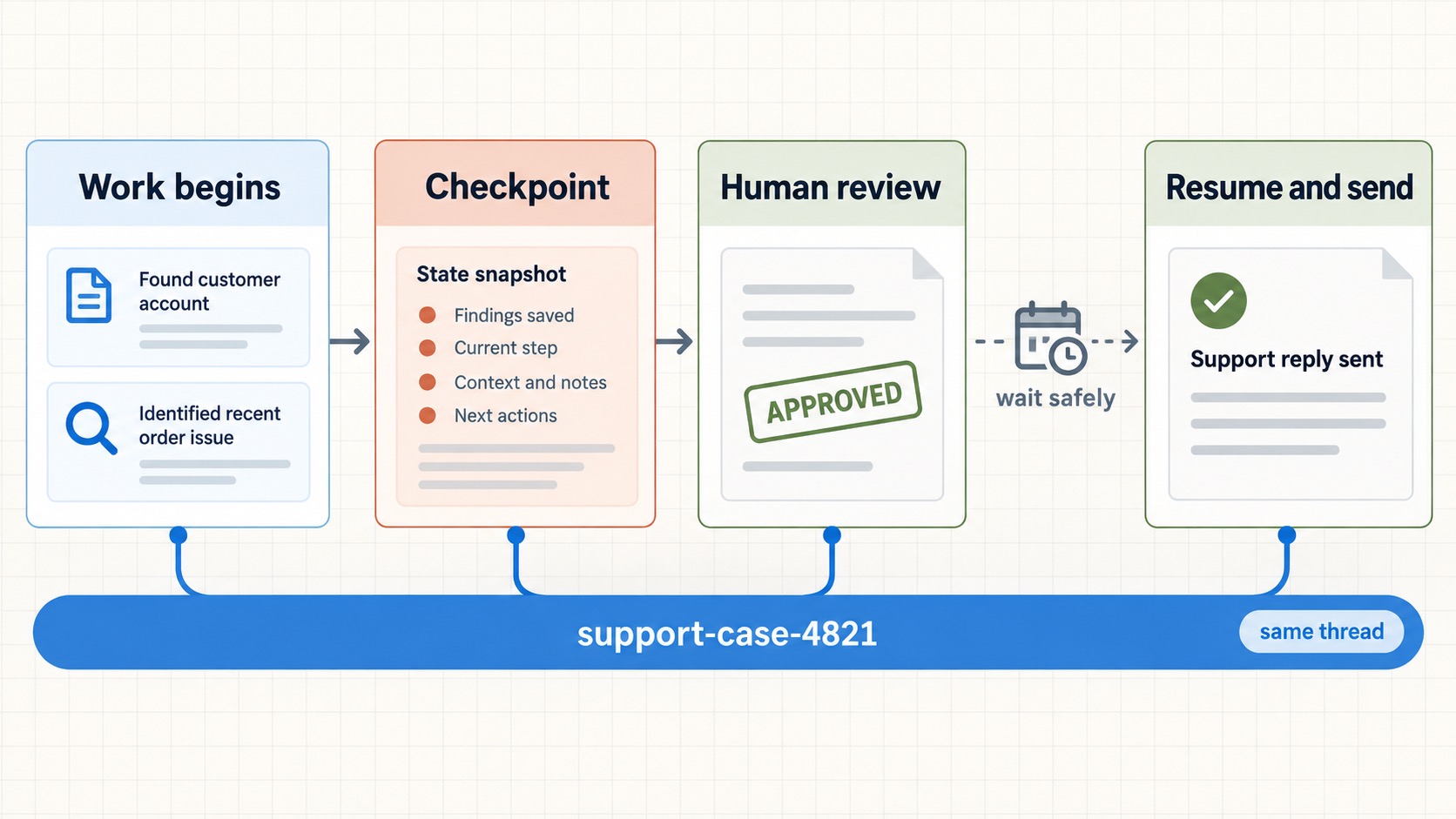
LangGraph persistence is what makes a multi-agent workflow safe to pause, inspect, and continue later. Without it, a process restart, a human review step, or a temporary failure can mean starting the whole graph again—and possibly repeating work that already happened.
In the previous tutorial on routing and parallel execution, a router selected specialist agents and merged their results. This tutorial gives that workflow a durable thread: it checkpoints progress, pauses before a consequential action, and resumes from the same point when a reviewer is ready.
What you will build
You will add a review gate to a simple multi-agent workflow. The graph will:
- prepare a draft answer from worker findings;
- save its state at graph steps through a checkpointer;
- pause for a reviewer before sending the answer;
- resume using the same thread ID; and
- send only after approval.
The important distinction: a checkpointer stores the state of one workflow thread. It is not a general user-profile database. Long-term preferences and facts that must survive across separate threads belong in a LangGraph store.
How LangGraph persistence gives a workflow a stable thread
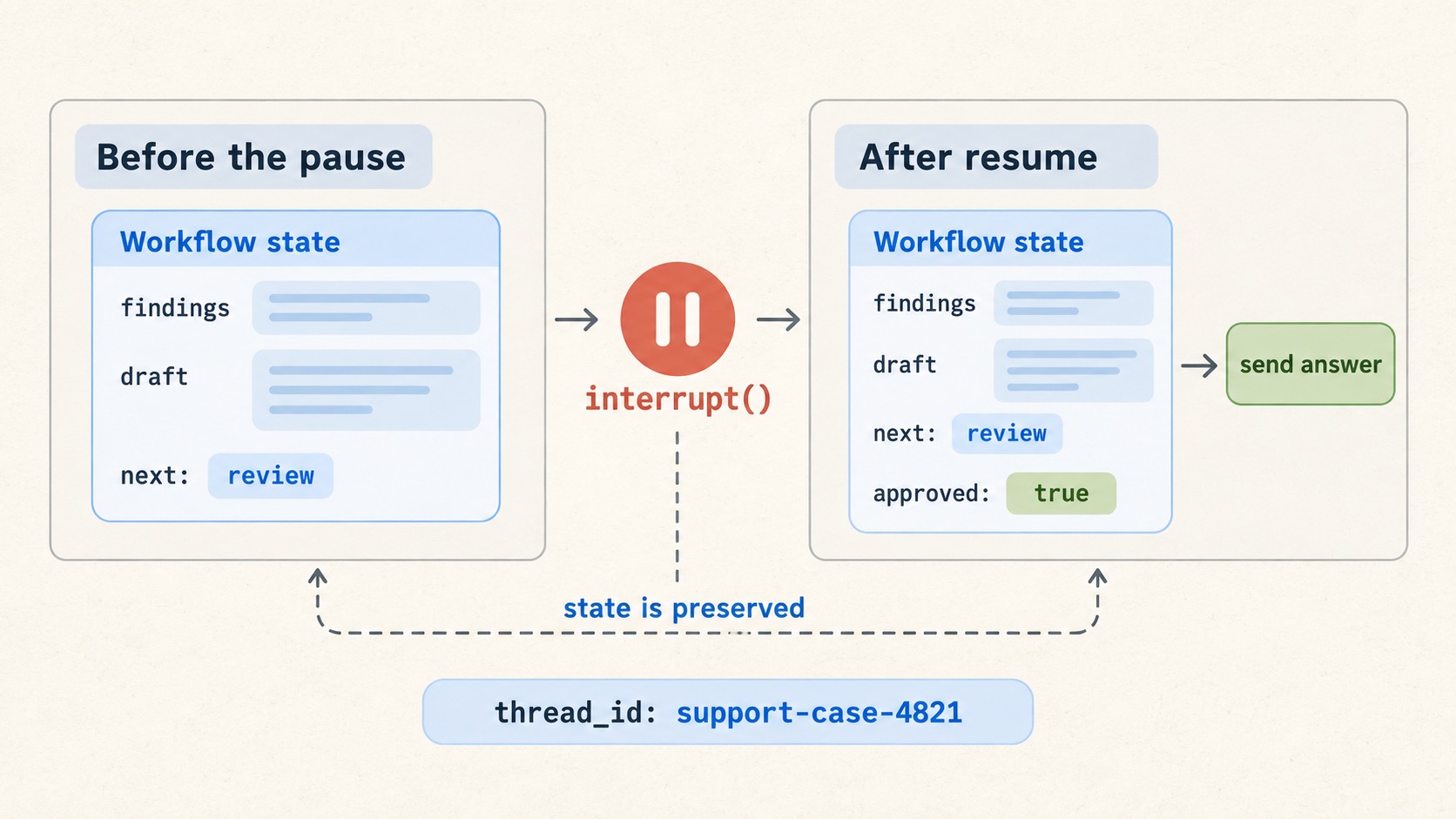
When you compile a graph with a checkpointer, LangGraph records state snapshots as the graph progresses. The thread_id in the invocation config tells it which sequence of snapshots to load. Reuse the same ID to continue one workflow; use a new ID to begin another.
from langgraph.checkpoint.memory import InMemorySaver

checkpointer = InMemorySaver()
graph = builder.compile(checkpointer=checkpointer)

config = {
    "configurable": {
        "thread_id": "support-case-4821"
    }
}
InMemorySaver is useful for learning and tests, but its data disappears when the process stops. For local development, use SQLite; for production, use a durable database-backed checkpointer such as Postgres. The official persistence guide lists the supported integrations.
Put the approval point in the graph
An interrupt is a deliberate pause inside a node. LangGraph saves the current state, returns a JSON-serialisable request to the application, and waits. The caller later supplies a response using Command(resume=...).
from typing import TypedDict

from langgraph.checkpoint.memory import InMemorySaver
from langgraph.graph import END, START, StateGraph
from langgraph.types import Command, interrupt


class ReviewState(TypedDict):
    findings: list[str]
    draft: str
    approved: bool


def write_draft(state: ReviewState) -> dict:
    findings = "\n".join(f"- {item}" for item in state["findings"])
    return {"draft": f"Proposed answer:\n{findings}"}


def request_approval(state: ReviewState) -> dict:
    decision = interrupt(
        {
            "action": "send_answer",
            "draft": state["draft"],
            "message": "Approve, reject, or edit this answer."
        }
    )
    return {
        "approved": decision["approved"],
        "draft": decision.get("edited_draft", state["draft"]),
    }


def send_answer(state: ReviewState) -> dict:
    if not state["approved"]:
        return {}
    # Call the email, ticket, or messaging service here.
    return {}


builder = StateGraph(ReviewState)
builder.add_node("write_draft", write_draft)
builder.add_node("request_approval", request_approval)
builder.add_node("send_answer", send_answer)
builder.add_edge(START, "write_draft")
builder.add_edge("write_draft", "request_approval")
builder.add_edge("request_approval", "send_answer")
builder.add_edge("send_answer", END)

graph = builder.compile(checkpointer=InMemorySaver())
The useful design choice is that the sending action sits after the approval gate. A reviewer can see and change the proposed answer before an external system receives anything.
Start, pause, and resume the same run
config = {
    "configurable": {
        "thread_id": "support-case-4821"
    }
}

paused = graph.invoke(
    {
        "findings": [
            "The customer was charged twice.",
            "A refund has not yet been initiated."
        ],
        "approved": False,
    },
    config=config,
)

# The application presents paused["__interrupt__"] to a reviewer.

completed = graph.invoke(
    Command(
        resume={
            "approved": True,
            "edited_draft": "We are sorry about the duplicate charge. Your refund is now being processed."
        }
    ),
    config=config,
)
The identical thread_id is essential. It reconnects the second call to the paused state. The resume value becomes the value returned by interrupt() inside request_approval.
Design for replay, not just the happy path
When a graph resumes from an interrupt, LangGraph restarts the interrupted node from its beginning. Any code before interrupt() runs again. That is intentional: the runtime can rebuild the node’s work consistently. It also means that a payment, email, database write, or third-party API request before the interrupt could happen twice.
Use these rules to avoid that mistake:
- Put irreversible actions after the approval interrupt. Draft and inspect first; send or charge only once approval is present.
- Make external actions idempotent. Pass a stable idempotency key to services that support one, or record a unique operation ID yourself.
- Keep interrupt payloads simple. Send JSON-serialisable data the user interface can render: the proposed action, the relevant draft, and the allowed choices.
- Use a durable checkpointer outside experiments. RAM-backed checkpoints cannot recover after a restart.
These rules are especially important in multi-agent systems: several workers may have produced useful findings, but only one final action should change the outside world.
Checkpointer or store?
| Need | Use |
|---|---|
| Continue this exact support case tomorrow | Checkpointer + the same thread_id |
| Inspect earlier graph state while debugging | Checkpointer |
| Remember a user’s language preference across future conversations | Store, namespaced by user |
| Keep product knowledge shared by every workflow | Store or another application data source |
This boundary keeps state understandable. A checkpoint answers “where was this run?” A store answers “what should the application remember more broadly?”
A practical recovery checklist
- Assign a stable, non-sensitive thread ID to each workflow instance.
- Compile the graph with a checkpointer.
- Use
interrupt()for approvals or missing human input. - Resume with
Command(resume=...)and the original thread ID. - Ensure code before an interrupt can run more than once safely.
- Choose a persistent backend and a retention policy before production.
Where this fits in the series
Routing decides which agents should work. Persistence makes that work survivable when a person, an external dependency, or a system restart interrupts the flow. The next tutorial will focus on evaluating the system: whether it routed correctly, used tools appropriately, and delivered reliable answers at an acceptable cost.